Every graphics card we sell is stress-tested on its own in a dedicated test PC, graded from the results, and checked by a person before it ships. This article shows exactly how: the bench, the stress test, how a card passes or fails, and what your test report tells you. It describes our method as of November 2026, and we’ll update it when the method changes.
At a glance
- Each card is tested on its own in a dedicated Windows 11 test PC built to one baseline.
- We record the card’s identity and compare it with earlier runs of the same card.
- The graded stress test is OCCT’s 3D Adaptive test at a steady, Extreme-intensity load, 15 minutes by default.
- Temperatures, power, clocks, load and fan speed are recorded every second.
- A clean run passes. Errors, a hardware error or a driver crash fail the card; anything unclear goes to a person.
- Optional tests (an AI inference test on AMD Radeon cards and a VRAM memory test) run after the stress test.
- Check-in. The card is logged by its serial number and inspected.
- Identity checks. IDs, VBIOS and GPU model are recorded and compared.
- OCCT stress test. The graded test, always run first.
- AI inference and VRAM tests. Run after the stress test, when they apply. Optional
- Suggested outcome. The bench proposes a grade from all results.
- Person checks. A person reviews the results and makes the final call. Human review
- Test report. Linked from your shipping confirmation.
Our test bench
Every card is tested in a bench PC that does nothing else, built to one baseline environment:
| Part | Our baseline |
|---|---|
| Processor and board | Intel Core i5-13400F, ASUS ROG STRIX B760-I GAMING WIFI |
| Memory | 32 GB DDR5-4800 (2 × 16 GB) |
| Power supply | 1000 W or larger, 80 PLUS Platinum ATX, with headroom for high-power cards |
| Setting | Open-air bench, not inside a case, in a room at about 73 °F (23 °C) |
| Graphics slot | The board’s x16 slot; current cards typically run at PCIe 4.0 x16, and the AI test records the actual link |
| Resizable BAR | On for every bench (AMD calls it Smart Access Memory); the AI test records it on every run |
| Operating system | Windows 11, version 25H2 (build 26200) |
| Graphics driver | The latest stable AMD and NVIDIA releases once qualified on our bench; AMD cards currently on Adrenalin Edition 26.10.1 (Minimal install) |
| Other GPUs | None: the card under test is the only discrete graphics card in the PC |
The stress and memory test tools are pinned to exact versions. Before one runs, the bench checks its file against a known fingerprint (a SHA-256 hash), and it won’t run a tool that doesn’t match. FastLLM comes to the bench through our own signed release channel.
| Tool | What it does | Version |
|---|---|---|
| OCCT Enterprise (command line) | The graded stress test | 17.1.10 |
| memtest_vulkan | VRAM memory test | 0.5.0 |
| FastLLM | AI inference test on AMD Radeon cards | Current build from our signed channel, with pinned llama.cpp builds |
One routine for every card
Each card is installed as the only graphics card in a bench PC built to that baseline. Our bench software runs the tests unattended and sends the results to our inventory system. The card is checked in by its serial number, so every run of that card is kept together in one history. The bench suggests an outcome, but it doesn’t make the final call: a person reviews each card’s results before the card moves on.
Inspection
Before a card goes on the bench, we inspect it for physical damage: the PCIe connector, the display outputs, the fans and the cooler. While the stress test runs, we listen for coil whine and for fan noise such as grinding or rattling. We confirm that the card produces a display output; we don’t test every display port by default. If we repaste a card, your test report shows the date.
Making sure we tested the right card
A result only means something if it belongs to the right card, so we check three things:
- Identity record. Each run records the card’s PCI device and subsystem IDs and its VBIOS version. If these differ from an earlier run of the same serial number, the card is flagged for review. A new VBIOS revision of the same board isn’t treated as a different card, because a firmware update or the card’s own BIOS switch can change it.
- Model check. The GPU model the bench detects is compared with the model the card is listed as. A disagreement is flagged for a person to check.
- One GPU in the test. The stress test only starts when the card under test is the only discrete GPU in the PC. Afterwards we check that the stress test’s own report names that same GPU; if it doesn’t, the run isn’t used to grade the card.
The stress test: OCCT 3D Adaptive
The graded test is OCCT, a stability-testing program from OCBASE. We run the command-line build of OCCT Enterprise 17.1.10, under license, using its 3D Adaptive test:
| Setting | What we use |
|---|---|
| Load | Steady mode at Extreme intensity: a constant, full load for the whole run, meant to push the card to its limits |
| Error detection | Built into 3D Adaptive; OCCT keeps running after an error and reports the total error count |
| Length | 15 minutes by default; a run can instead be set to 5, 10, 30, 60 or 120 minutes, and OCCT runs exactly that length |
The bench only runs the OCCT build and test settings we validated. If the program file or the settings don’t match, the test doesn’t start.
Here is what one passed run looks like. These are the per-second readings from a 15-minute OCCT run on an AMD Radeon RX 7900 XTX: the card warms up in the first minute as the load ramps to 100%, then holds steady, with board power near 400 W and brief peaks to 450 W.
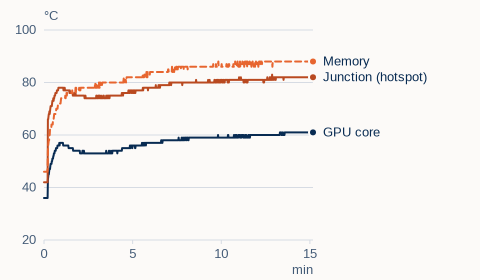
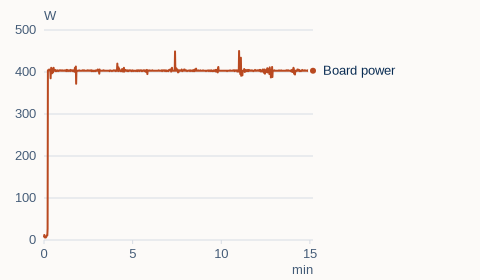
Chart data summary
- GPU core: min 36 °C, max 61 °C, average 57.04 °C
- Junction (hotspot): min 42 °C, max 83 °C, average 78.09 °C
- Memory: min 46 °C, max 88 °C, average 82.56 °C
- Board power: min 6 W, max 450 W, average 397.55 W
Safety stops
Two automatic stops protect the card and the bench during the stress test.
What we measure
| When | What the bench records |
|---|---|
| Every second | GPU core, junction (hotspot) and memory temperatures; board power; core and memory clocks; GPU load and fan speed |
| For each test | Driver resets (TDR: Windows restarting the graphics driver after the GPU stopped responding) and WHEA hardware errors, from the Windows event log |
| Long runs | Up to an hour of readings per test is kept sample for sample; longer series are thinned, but the peak core and junction temperatures and the peak power from every part of the run are kept |
How a result is graded
The bench suggests one of these outcomes from the OCCT result, the event log and any optional tests. A person then reviews it.
Passed
A clean, full-length run
OCCT ran its full, scheduled length on the right card with 0 errors; no driver reset or hardware error was logged; and none of the other outcomes applies.
Failed
A hard error or crash
OCCT found errors (even if the run stopped early); OCCT stopped on a hardware error; a driver reset happened during any test except the AI test; a hardware error was logged during any test; or the AI test failed.
Needs review
Something a person must check
OCCT’s temperature safety stop ended the run; the card’s identity changed from an earlier run; the VRAM test found a memory error; or the AI speed was below the expected range for that kind of card.
Needs review: retest suggested
The run can’t be trusted
The run can’t be trusted either way: it stopped early, ran a different length than requested, couldn’t confirm which GPU it tested, or left no usable report. The card is tested again; this never counts as a pass.
Optional tests
Depending on the card, we may run up to two more tests. They run in the same session, after the OCCT stress test.
AI inference (AMD Radeon cards)
This test uses FastLLM, our local AI package for AMD Radeon cards, which is still in development (Preview). FastLLM uses pinned builds of llama.cpp, on HIP or Vulkan. The test loads a model chosen for the card’s memory size, measures prompt-processing and text-generation speed, and runs a short self-test of the model’s answers.
If the AI test fails, the card fails. Every AI run’s speed is graded: against our measured reference for that kind of card when we have one, and otherwise against a baseline calculated from the card’s memory bandwidth. A result below the expected range goes to review. You can see our published measurements on the FastLLM test results page.
VRAM memory test
This test checks the card’s video memory for errors, using memtest_vulkan, an open-source Vulkan memory tester. A memory error sends the card to review, and the card stays flagged until it passes a new full stress test and review.
What’s in your test report
Your shipping confirmation email links to your card’s test report. Here is a sample built from the passed run above:
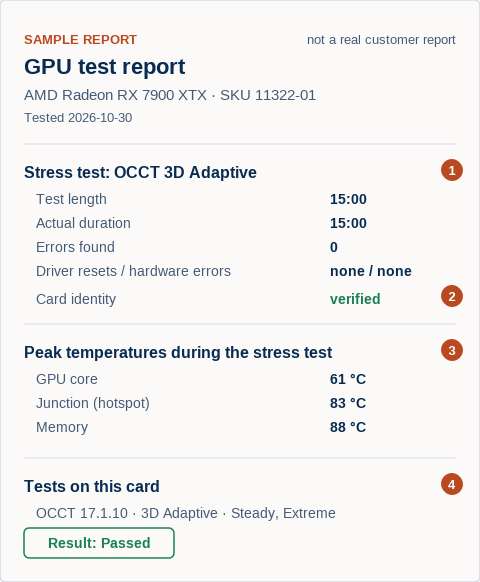
- The stress-test result: the test length, the actual duration and the number of errors found.
- Card identity: “verified” when OCCT’s own report matched the card we meant to test.
- Peak temperatures for the GPU core, junction (hotspot) and memory during the stress test.
- The tests that ran on your card and the final result.
A real report also shows the GPU board and test date, whether a display output was detected, the AI inference result when that test was run, and telemetry charts and the VRAM memory test result when available. Cards tested before the change to OCCT keep their original report, which shows the Kombustor result they were graded on.
Why we moved from Kombustor to OCCT
Until late October 2026, our graded stress test was MSI Kombustor, combined with our own automated scan of its output for visual artifacts. That approach went wrong in both directions:
| Problem | What happened |
|---|---|
| False positives | The scan flagged artifacts on cards that were healthy. In one case, a card it flagged worked perfectly in real use. |
| Missed problems | Cards that did have issues could finish the Kombustor run without the scan detecting anything. |
OCCT is actively developed commercial software, with error detection built into the stress test itself. It now decides the stress result, and Kombustor is no longer part of our testing.
AI/compute-only cards
Some cards are sold as AI/compute-only, marked “AI-qualified — Tested for AI/compute, not graphics”. These cards are not for gaming or display use. A card that doesn’t pass the graphics grade, but does pass the AI/compute qualification, can be offered this way. Instead of the graphics grade, these cards pass an AI/compute qualification:
- AI inference correctness check. The model’s answers are checked for correctness.
- Sustained AI load test. A long AI workload with correctness re-checks and full temperature and clock telemetry.
- VRAM memory test. The card’s video memory is checked for errors.
What a bench test can’t tell you
About the tools we use
OCCT is a product of OCBASE. MSI Kombustor is a product of MSI. memtest_vulkan and llama.cpp are independent open-source projects. Bitworks isn’t affiliated with any of these developers, and none of them reviews or endorses our results. All product names are trademarks of their respective owners.